Building a Professional Moving Service Site with the Packers Movers Web UI Kit
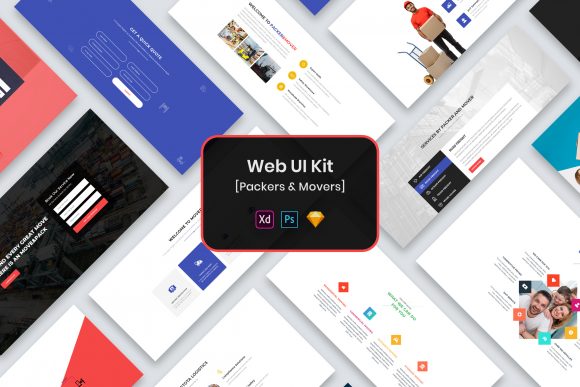
Launching a website for a logistics or relocation business requires more than just functional code; it demands a design that instantly communicates trust, efficiency, and professionalism. This is where the Packers Movers Web UI Kit becomes an invaluable asset for designers and business owners alike. As a modern and minimal design template available in PSD, Figma, Sketch, and Adobe XD formats, it offers a streamlined foundation for creating high-converting landing pages and service portals. However, possessing a high-quality template is only half the battle. Many creators fall into the trap of assuming that a premium UI kit guarantees a perfect final product without requiring strategic adaptation. To truly leverage this tool, one must understand not just what is included, but how to avoid common pitfalls that can undermine the user experience and brand perception.
The primary appeal of this UI kit lies in its versatility and organization. It comes with well-organized layers, purposeful elements, and widgets designed specifically for the moving industry. Yet, a frequent mistake beginners make is overlooking the importance of file organization before they even begin designing. When you download a package containing four different formats, it is tempting to jump straight into the software you are most comfortable with. However, failing to review the "Fonts Used" file or ignoring the note that images and vectors are for preview purposes only can lead to significant delays. If you do not verify the free fonts linked in the documentation, your development handoff may suffer from typography mismatches, forcing developers to guess font weights or families later. Always start by auditing the assets provided to ensure you have everything needed for production, excluding the preview-only mockups.
Misunderstanding the Scope of "Minimal Design"
The term "minimal design" is often misinterpreted as "empty design." Some users take the clean aesthetic of the Packers Movers Web UI Kit and strip away too much information, believing that less is always better. In the context of packing and moving services, customers are looking for specific details: pricing transparency, service areas, insurance information, and clear calls to action. A common error is removing essential trust signals in the name of aesthetics. While the kit provides a creative and professional layout, it is your responsibility to populate it with content that answers user queries immediately. If a potential client cannot find a quote calculator or a phone number within seconds because the design is too sparse, conversion rates will drop. The minimalism offered here should be used to highlight key information, not hide it.
Furthermore, the "pixel perfect" nature of these files can sometimes lead to rigidity. Designers might feel constrained to keep every element exactly as it appears in the template, fearing that changes will break the visual harmony. This is a misconception. The kit is fully customizable, meaning the grid, spacing, and component sizes are meant to be adapted to your specific brand identity. For instance, if your moving company specializes in international relocation rather than local moves, the imagery and widget hierarchy may need adjustment. Sticking rigidly to the default layout might result in a generic look that fails to differentiate your business from competitors. Use the well-organized widgets as a starting point, then modify them to reflect your unique value proposition.
Navigating Format Compatibility and Workflow
With four formats included—PSD, Figma, Sketch, and Adobe XD—users often face decision paralysis or workflow inefficiencies. A practical warning for teams is to standardize on one format early in the process. Switching between Figma and Adobe XD midway through a project can introduce version control issues, especially when dealing with complex components like interactive quotes or service sliders. While the files are easily editable, each software handles auto-layout and constraints differently. If your development team works primarily with CSS frameworks that align closely with Figma's auto-layout, choosing the Sketch or PSD version might create unnecessary friction during the handoff phase. Evaluate your team's existing tech stack before selecting the file format to ensure a smooth transition from design to code.
Another overlooked detail involves the retina-ready assets. The kit is optimized for high-resolution displays, which is crucial for modern web standards. However, some designers forget to export assets correctly for web use, leading to bloated file sizes that slow down page loading speeds. Just because the source file is retina ready does not mean the exported images will be optimized automatically. You must ensure that when you extract icons or illustrations from the vector files, they are compressed appropriately for the web. Large, unoptimized images can negatively impact SEO and user retention, particularly for mobile users who are often searching for moving services on the go.
Avoiding the "Preview Asset" Trap
One of the most critical notes accompanying this UI kit is that all images, vectors, and mock-ups are for preview purposes only and are not included in the download. Despite this clear disclaimer, many users attempt to launch their sites using the placeholder images found in the template. This is a severe error that can lead to copyright infringement issues and a lack of authenticity. Stock photos of generic movers rarely match the actual fleet or uniform of your specific company. Customers today value transparency; seeing real photos of your team and trucks builds significantly more trust than polished, generic stock imagery. Treat the preview images strictly as placeholders to visualize layout balance, and replace them immediately with authentic photography that represents your actual operations.
Additionally, relying solely on the included widgets without considering mobile responsiveness is a risk. While the design is modern, the way widgets behave on a desktop screen versus a smartphone can vary. The "purposeful elements" mentioned in the feature list are designed with logic, but they still require testing across different breakpoints. A contact form that looks elegant on a wide monitor might become cumbersome on a narrow mobile screen if not adjusted. Always prototype your interactions on multiple devices. The ease of editing these files allows you to tweak padding, font sizes, and button placements specifically for mobile views, ensuring that the user experience remains seamless regardless of the device used.
Final Considerations for Implementation
Before finalizing your design, take a moment to review the credits and licensing terms regarding the fonts and any third-party resources referenced. Even though the fonts are free, understanding their licensing ensures you remain compliant for commercial use. Moreover, consider the scalability of your design. The Packers Movers Web UI Kit provides a solid foundation, but your business may grow to include storage solutions, cleaning services, or vehicle shipping. Ensure that the modular nature of the kit allows you to add new sections without disrupting the overall visual language. By approaching this template with a mindset of adaptation rather than mere installation, you can create a digital presence that is not only visually stunning but also functionally robust and aligned with your business goals.
In summary, the value of this UI kit is realized through thoughtful implementation. Avoid the traps of rigid adherence to the template, neglecting mobile optimization, or using unauthorized preview assets. Instead, focus on customizing the minimal design to serve your content strategy, verifying your font and asset pipelines, and ensuring that every widget serves a clear purpose for your customer. By doing so, you transform a set of design files into a powerful tool that drives engagement and establishes your brand as a leader in the moving industry.